SaaS
What Should a SaaS Landing Page Include? A Practical Guide
The essential sections to plan for, from product messaging and features to pricing and sign-up calls to action.
4 min read
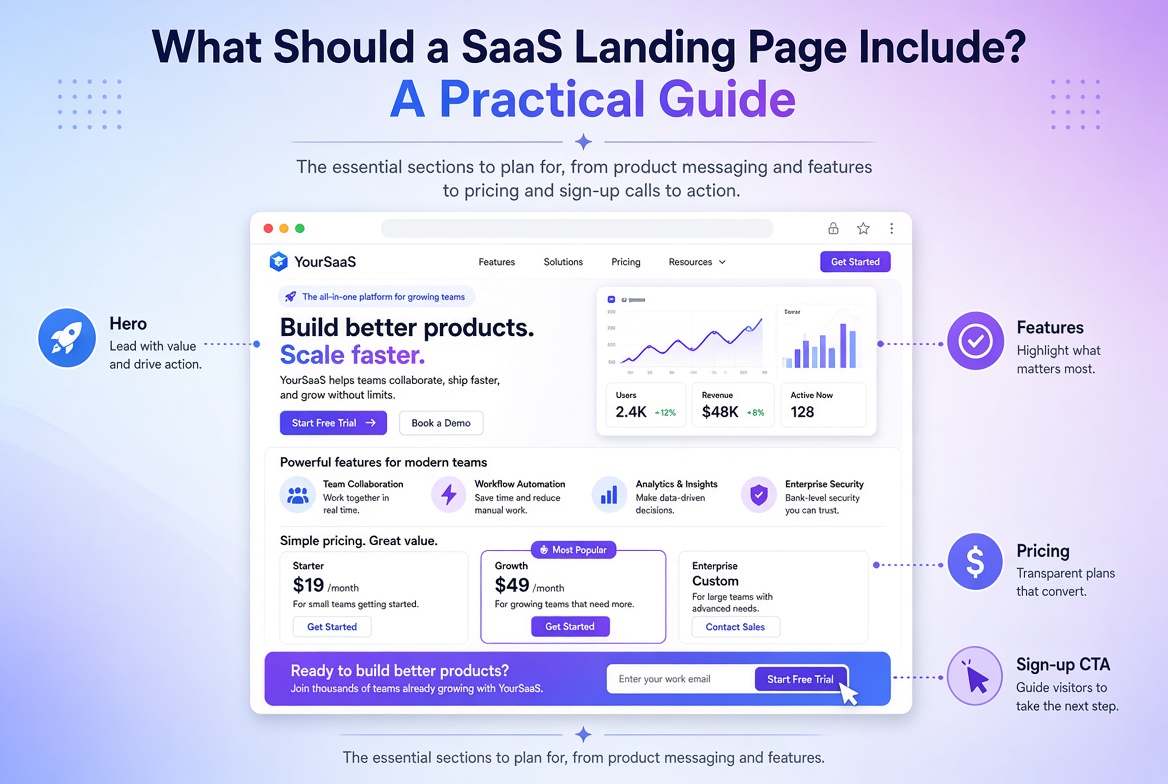
Launching a SaaS product is only part of the challenge. You also need a landing page that helps potential customers understand what your software does, why it matters and how they can get started.
A SaaS landing page is often one of the first places prospective customers interact with your product. If the messaging is unclear, the benefits are difficult to understand or the sign-up process is confusing, visitors may leave without taking action.
So, what should a SaaS landing page include?
Here are the essential sections to consider when planning one for your software business.
1. A clear headline explaining your product
Your hero section should communicate what your product does and who it helps.
Avoid vague headlines that sound impressive but don't explain the actual product.
Instead, focus on:
- The problem your software solves.
- The people who benefit from it.
- The main outcome customers can expect.
Your headline should help a first-time visitor understand your product without needing to explore the entire page.
2. A clear call to action
Every SaaS landing page needs a primary action.
Depending on your business model, this might be:
- Start a free trial.
- Create an account.
- Book a demo.
- Get early access.
- Request a product walkthrough.
Make the action visible and use consistent wording throughout the page.
Avoid presenting too many competing actions in the same section.
3. Product features and customer benefits
Visitors need to understand what your software can do, but listing features alone isn't enough.
Explain how each feature helps customers solve a problem or complete a task.
For example, instead of simply saying "Automated reporting", explain how customers can save time by generating reports without manually collecting information.
Use concise descriptions, screenshots and visual examples to make the product easier to understand.
4. Product screenshots or demonstrations
A SaaS product can be difficult to understand from text alone.
Screenshots, interface previews and short product demonstrations can help visitors see what they're signing up for.
Choose visuals that demonstrate meaningful product functionality rather than filling the page with decorative graphics.
Make sure screenshots are readable on mobile devices and don't significantly slow down the page.
5. Social proof and testimonials
Potential customers often want reassurance before trusting a new software product.
If you have genuine customer testimonials, reviews, case studies or recognisable customer logos that you have permission to display, use them to build credibility.
Keep testimonials specific and authentic. A useful testimonial explains what problem the product solved or how it helped the customer.
Never publish fabricated testimonials or imply that a company is a customer without permission.
6. Pricing information
If your product has straightforward pricing, displaying plans can help visitors evaluate whether the product fits their needs.
A pricing section might include:
- Available plans.
- Key differences between plans.
- Billing frequency.
- Trial or cancellation terms.
- A link to detailed pricing information.
If your product requires custom pricing, a clear "Book a Demo" or "Contact Sales" action may be more appropriate.
7. Frequently asked questions
A well-written FAQ section can address common concerns before visitors decide to sign up.
Consider questions about:
- How the product works.
- Who the product is designed for.
- Pricing and subscriptions.
- Free trials.
- Integrations.
- Data security.
- Customer support.
Answer questions clearly and avoid hiding important product information behind vague statements.
8. A responsive and fast-loading experience
Your SaaS landing page needs to work properly on mobile phones, tablets and desktops.
Responsive implementation should cover typography, navigation, screenshots, buttons, forms and spacing.
Performance also matters. Large images, unnecessary scripts and poorly implemented animations can make a page feel slow.
A well-developed landing page should balance visual quality with usability and loading performance.
9. SEO fundamentals
If you want your SaaS landing page to attract organic search traffic, make sure it has:
- A descriptive page title.
- A relevant meta description.
- One clear primary heading.
- Logical heading structure.
- Useful, crawlable page content.
- Descriptive image alt text.
- Appropriate internal links.
- Optimised images and good performance.
SEO is an ongoing process. A technically well-built page does not automatically guarantee search rankings.
How much does a SaaS landing page cost?
The cost depends on design complexity, page length, integrations, content readiness and custom functionality.
A SaaS landing page built from an approved Figma design may require a different scope from one that needs extensive planning, interactive sections and custom integrations.
Define your requirements before requesting a development quote.
Need a landing page for your SaaS product?
I build custom, responsive landing pages for SaaS companies, startup founders and growing businesses.
Whether you have an approved Figma design or an idea that needs a clear development plan, I can help turn it into a production-ready landing page.
Discuss your SaaS landing page and let's talk about your product.
Learn more about my landing page development service or see recent projects.